Collaboration
Make the deck together, live.
Real-time collaboration for your team’s presentations: everyone’s cursor, every change as it happens, and no one’s work lost to someone else’s save.
On Slicess Business · $25 per seat a month, from 3 seats
What you see
Your team, right there on the slide.
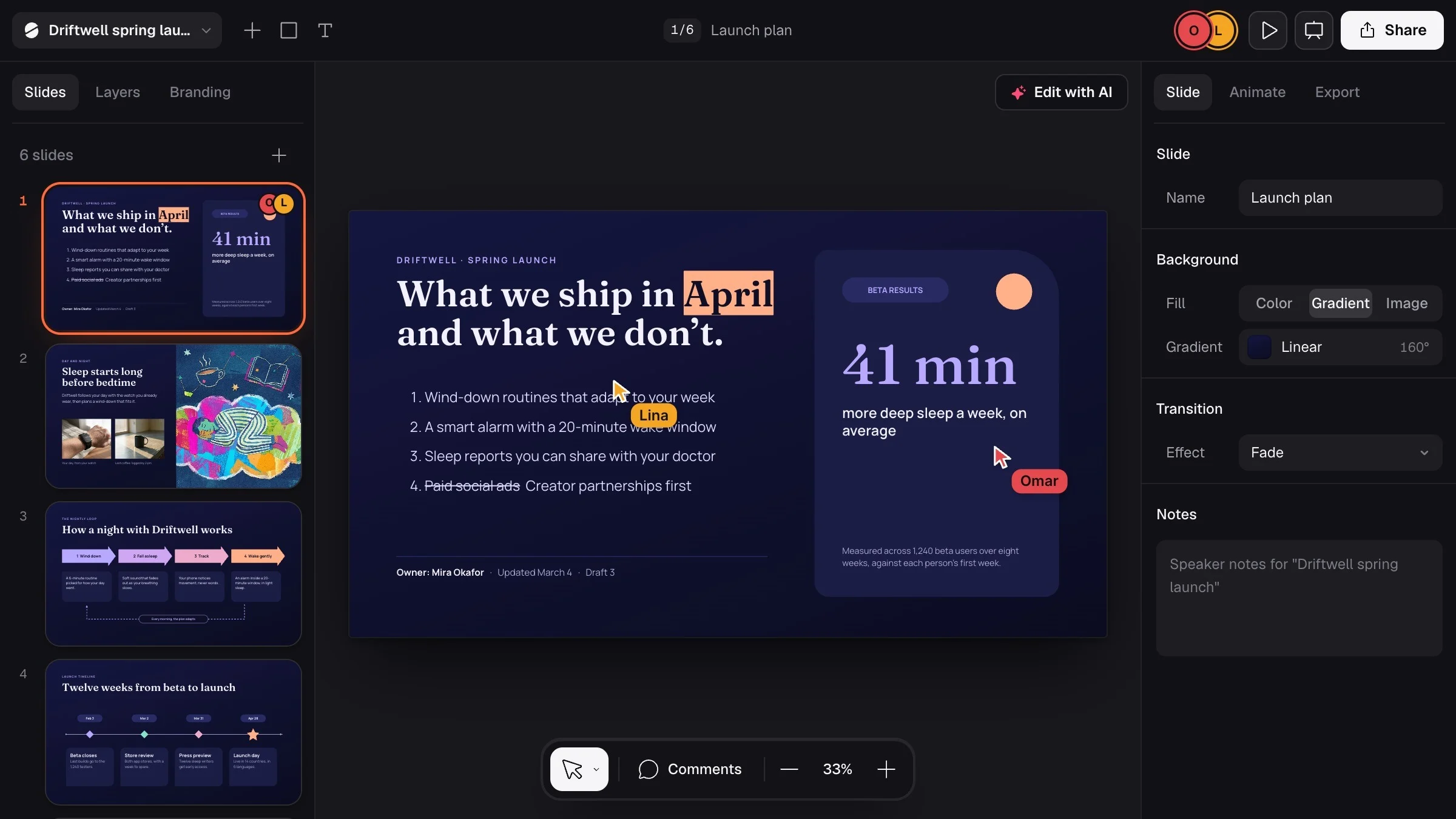
Live cursors
Everyone on your slide has a cursor in their own colour, with their name beside it.
Who’s in the deck
Faces in the top bar show who has the deck open. Hover to see their slide, click to jump there.
What they’ve selected
Shapes a teammate has selected are outlined in their colour, so you can see what they’re working on.
Changes as they happen
Moves, words, new shapes and new slides show up for everyone while they’re being made. No reloading.
Who’s on which slide
Small dots on the slide list show where each teammate is right now.
Your undo stays yours
⌘Z takes back your own changes, never a teammate’s.
As it happens
Two screens, one deck.
Omar drags a card on his screen. On Sara’s, it moves at the same moment, with his cursor on it.


In the editor
Built into every slide.
Close-ups of the real editor, with three people in one deck.
Cursors with names
Each person’s arrow and name glide across the slide as they work.

Faces in the top bar
Up to three faces, then a count. Each one is ringed in that person’s colour.


Dots on the slide list
See at a glance who’s on which slide, and spread out or join in.



Reconnecting, not lost
If your connection drops, keep editing. Your changes join everyone else’s when you’re back.
Nothing overwritten
Many hands, one deck, no lost work.
Slicess saves each person’s changes on their own, so one person’s save never undoes another’s.
- Each person’s changes are saved on their own, slide by slide
- Different shapes on the same slide? Both changes stay
- The same shape at the same moment? Everyone ends up with the same result
- The words you’re typing are never replaced under you
- A slide added, moved or deleted by a teammate shows up in your slide list at once
- Offline for a moment? Keep editing; your changes join the rest when you’re back
Who joins
Only the people who can edit.
Live editing is private to each deck: only the people who can edit it join in.
Your team
Everyone in your Business workspace can open the team’s decks and edit them with you, live.
People you invite to comment
They see the slides and the comments, and add their own. They don’t edit.
Anyone with a link
A view-only link shows the finished deck, nothing more.
How it works
Edit together in three steps.
Start a team
Choose Business in Settings › Team, pick your seats and send your teammates the invite link.
Share a deck with the team
On Home, open a deck’s menu and choose Share with your team.
Open it together
Everyone who opens the deck sees each other and edits it live.
Questions
Working together, answered.
Who can edit a deck together?
How many people can edit at once?
What happens if two people change the same thing?
What if my connection drops?
Can I undo a teammate’s change?
Is live editing on every plan?
More with Slicess
More for working together.
Your team’s next deck, together.
Start free on your own, then bring your team in on Business and edit every deck together, live.
1,000 free credits every month · No card needed